Archive for category Java
Java Tutorial 3 – If Else Statements
If else is exactly as same as If else in C/C++.
Lets do this in New Class to create a new Class don’t create new project. click on package above your class and select new –> java class and give name to the class anything you want then hit enter.

Add this code to new created class and you might get idea.

- create main() method.
- defined an int and a Scanner object for user input (refer to previous tutorial)
Here i have not used {} after if() because if there is only 1 line in the if(){ … } it is optional to do {}.
you can try it by removing {} from else also.
You can add more den 1 condition in if statement by separating them with &&(and) ||(or)
else if() is also the same and u can try it at your own.
(what the fridge ! is it Home work !)
Again Doubts are invited.
Have a nice 1, Peace.
Java Tutorial 2 – User Input and Maths
First add this code:

Java is case sensitive so take care while typing.
How it works:
to get input from user we need to create a Scanner object that takes input.
We created Scanner object named “input”, you ca name it anything you like (eg. popcorn, bitch).
Now we created 3 doubles “x , y and ans”. Double is simply a variable that hold numeric value with decimal point.
We added System.out.println() lines to make it interactive.
in line “x= input.nextDouble();” we used input object and it’s “nextDouble()” method which returns a double and we stored it in the x.
We did same for variable y.
You can see suggestions while typing so you can find out other methods like nextInt() etc…
now understand this, System.out.println(“x+y =” + (x+y));
here “x+y =” is just a string but (x+y) is a value.
( confused..)
Any string in Java must be written in “…” and more than one strings can be printed together as “String 1” + “String 2”
and if u want to print string, int, double together simply saparet them with +.
for eg. If u want to print “your age is 10” and 10 is stored in variable x, you can do this by
System.out.println(“your age is ” + x ) and it will print the same.
And ya if you run it, it will run your previous class, but to run this class click shift+F6.
Thats it for this tutorial. Doubts are welcomed.
have a good 1, Peace.
Java Tutorial 1 – Downloading IDE and setting up new java project
In this tutorials what we do basically is get required tools and set our first project.
we require 2 things to be installed:
IDE means Integrated development environment which provides environment within our PC to create, edit, run and debug the java projects. Netbeans IDE is free and cool enough for use, but you can also use Eclipse or any other IDE (doesn’t matter).
Download both by clicking on above links. Just make sure you install JDK first.
(enough is enough when we start programming huh????)
Lets start:
Open Netbeans u just installed click on the new button shown below and follow the steps.


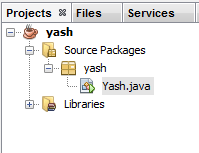
you can see your classes and files you create in you projects and navigate between them here.
 This is your Editor window
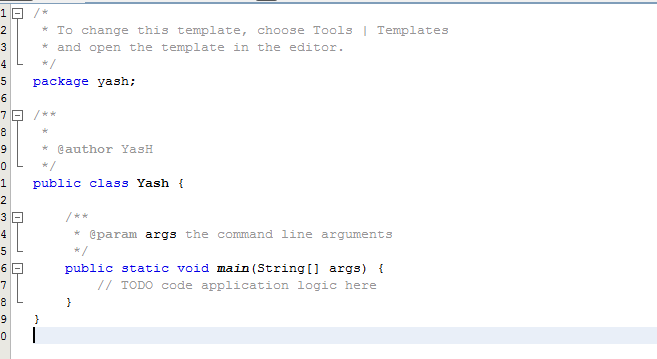
U can see here You have a class named “Yash”(or whatever you named it) (its gud habit to start name of the class with capital letter) and we have a method called public static void main(String[] args) which is exactly same as void main() of the C/C++.
For those who didn’t mess with programming yet main() is the method from which program starts.
We will start with simple program that outputs a sentence (String).
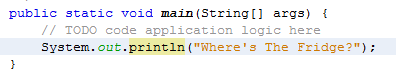
add a line “System.out.println(“Where’s The Fridge ?”);
now click on the Run button and you can see the output in window below the editor screen.

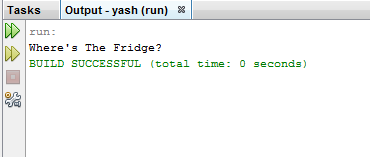
(what’s going on??)
System.out.println(); is the method which takes a String as a argument and prints it.
In next tutorial we will see how to get data from the user.
Have a nice day, Peace.
Java Tutorials
Hi guys im starting Java Basuc tutorials here to give you kick-start with Java.
I’ll start it within few days so keep checking.
In case of any doubt or request u can comment here, i’ll ans soon as possible.
 Idiot4